
Projection mapping glossary
Updated 3 November 2026
The basics
Projection mapping
Projecting video onto a real surface — a wall, window, object or building — so the picture fits its shape exactly instead of landing as a flat rectangle. Also called video mapping or spatial augmented reality.
Surface
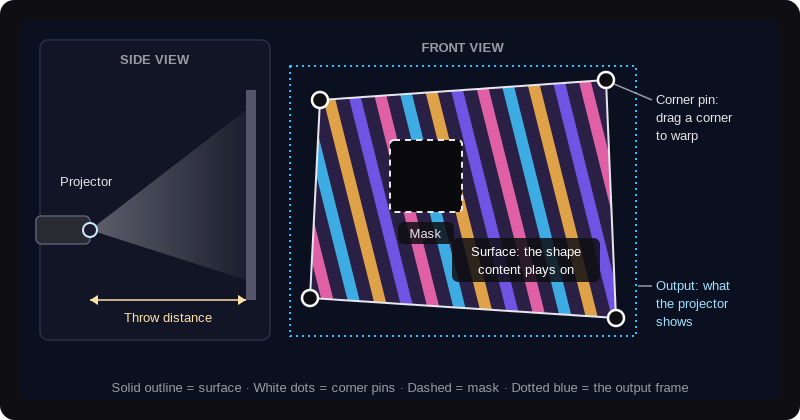
A shape in the mapping software that you fit onto one real-world area, like a wall or the front of a box. Each surface can be warped and masked separately, and shows its own part of the content.
Content
The video, images, animations or generated visuals that play on your surfaces.
Layer
One piece of content in a project. Layers stack on top of each other like in a photo editor, with opacity and blend modes deciding how they combine.
Canvas
The full picture your layers are composed into, before it's cut up and warped onto surfaces. A surface can show a region of the canvas, or its own clip directly.
Output
What gets sent to one projector. In Kaleidal Mapper each output is a window you place on the projector's display and make fullscreen.
Warping and fitting
Warping
Bending the picture so it fits a surface. The simplest kind moves the four corners; more advanced kinds curve the edges or move many points across the picture.
Corner pin (quad)
The most common warp: a four-cornered surface whose corners you drag onto the four corners of a flat object. Also called a quad or four-point warp.
Bezier surface
A surface with curved edges, controlled by handles. Useful for arches, curved walls and organic shapes.
Mesh warp
A surface divided into a grid of points that can each be moved, so the picture can follow bumps, columns or curved objects.
Keystone correction
A projector feature that squares up a picture when the projector is tilted. For mapping, turn it off: it throws away resolution, and the mapping software corrects the angle more precisely.
Test pattern
A grid, checkerboard or crosshair shown on a surface to line it up precisely before real content goes on.
Masks
Mask
A shape that hides part of a surface so no light lands there — for windows, doors, plants or people's faces. Masks make a mapping look cut precisely to the architecture.
Keep inside (inverted mask)
A mask that does the opposite of normal: the surface shows only inside the shape. Handy for round windows, picture frames and logos.
Feather
How soft a mask's edge is. A little feathering hides small alignment errors; no feathering gives a crisp, architectural edge.
Projectors
Lumens (ANSI lumens)
The standard measure of projector brightness. Around 2,000–3,000 ANSI lumens suits a small object or a window at night; walls with ambient light need 3,000–6,000. "LED lumens" and "lux" figures aren't the same and are often much higher than real brightness.
Throw ratio
How far a projector must be from the surface for a given picture width: distance ÷ width. A throw ratio of 1.5 at 3 metres (10 feet) gives a picture 2 metres (6.7 feet) wide.
Short throw
A projector with a throw ratio below about 1.0, which makes a big picture from close up — good for small rooms and for reducing shadows from people walking past.
Native resolution
The real number of pixels a projector has, often 1920×1080. Send it exactly this resolution for the sharpest picture.
Rear projection
Projecting onto the back of a translucent screen — like film on a window — so people see the picture from the other side. Common for Halloween and shop window displays.
Black level
How dark a projector's "black" actually is. Projectors always leak a little light, which is why masks and a dark room matter.
Multiple projectors
Edge blending
Overlapping the pictures of two or more projectors and fading each one out across the overlap, so together they look like one seamless image.
Overlap
The zone where two projectors' pictures cover the same area — usually about 15–25% of the picture width for edge blending.
Blend gamma
A setting that controls how brightness adds up across a blend. Projectors don't brighten in a straight line, so the fade needs a curve (around 2.2 suits most) to look even.
Content and effects
Codec
The way a video file is compressed. H.264 in an .mp4 file is the safest choice for browsers; HEVC and WebM (VP9 or AV1) are smaller but less universal.
Alpha channel
Transparency stored in a video or image, so parts of it are see-through. Transparent video lets figures float over other content.
Seamless loop
A video whose last frame flows into its first, so it can repeat forever without a visible jump.
Blend mode
How a layer combines with the layers below it — for example add to make light build up, or multiply to darken.
LUT
A "look-up table" file (.cube) that applies a colour grade in one step, such as a film look or a matching colour style.
BPM and tap tempo
Beats per minute — the speed of the music. Tap a button along to the beat and animated effects can stay in time with it. In Kaleidal Mapper, tempo sync is part of Pro (coming soon).
Generative visuals
Visuals made live by code (shaders) rather than played from a video file, like plasma, tunnels and patterns.
Software
PWA (installable web app)
A web app you can install from the browser so it opens in its own window and can work offline. Kaleidal Mapper is a PWA; starting it with no internet at all comes with the paid plans (coming soon).
WebGL2
The browser technology that lets web apps use your computer's graphics card. It's what lets Kaleidal Mapper warp and blend video smoothly without installing anything.