
Choosing a projector for projection mapping
By Chant Choi · Updated 21 October 2026 · 9 min read
Brightness, throw distance, resolution and the settings that matter — how to pick a projector that suits your space and budget.
You can learn projection mapping with almost any projector. But when you buy one specifically for mapping, a few numbers matter far more than the marketing on the box. This guide explains them in plain terms.
Brightness (lumens)
Brightness is measured in ANSI lumens. It's the single biggest factor in how good your mapping looks, because a projector can only add light — it can't make anything darker than the room already is.
Rough guide for the size of picture and the darkness of the room:
- Small objects, dark room (a box, a mask, a model): 1,500–3,000 lumens is plenty.
- A wall or shop window at night, some streetlight: 3,000–6,000 lumens.
- Large surfaces, events with some house lights: 6,000–10,000 lumens.
- Building façades outdoors: professional projectors well above 10,000 lumens, often several together.
Be wary of very cheap projectors with huge brightness claims: "lux" or "LED lumens" numbers are not ANSI lumens and are often several times higher than the real figure.
Throw ratio (how far away it must be)
The throw ratio tells you how wide the picture is at a given distance:
throw ratio = distance ÷ picture width
A projector with a throw ratio of 1.5 placed 3 metres (9.8 feet) away gives a picture 2 metres (6.6 feet) wide. Work out where your projector can physically sit, measure the width you need to cover, and check that the projector's throw ratio (or its zoom range) fits.
Move the same projector back to 5 metres (16.4 feet) and the picture grows to about 3.3 metres (about 10.9 feet) wide, but it's only about a third as bright as at 3 metres (9.8 feet), because the same light now covers almost three times the area.
- Standard throw (about 1.2–2.0): the most common and the most flexible.
- Short throw (below 1.0): big pictures in small rooms, and fewer shadows from people walking in front.
- Ultra-short throw (around 0.25): designed to sit right under a flat wall. Its steep angle makes it awkward for mapping objects with depth.
A zoom lens gives you leeway on placement. Lens shift — moving the picture up, down or sideways optically — is even more valuable, because it avoids tilting the projector.
Resolution
Choose a projector with native 1920×1080 (1080p) resolution or higher. Some projectors accept a 4K signal but display far fewer real pixels; look for "native" in the specifications.
Higher resolution matters most when you stand close to the projection or show fine detail such as text. For big abstract visuals viewed from a distance, brightness matters more.
Contrast and black level
Even when showing black, a projector still lets some light through, so "black" areas glow faintly. Projectors with better native contrast look much better for mapping, because the parts outside your shapes stay darker. Masks in Kaleidal Mapper help too, but they can't remove that glow completely.
Laser or lamp?
- Laser projectors switch on and off instantly, keep their brightness for 20,000 hours or more, and need no lamp changes. They cost more up front.
- Lamp projectors are cheaper to buy, but the lamp dims over time and needs replacing every few thousand hours.
For installations that run every day, laser usually works out cheaper and more reliable.
Settings to change on any projector
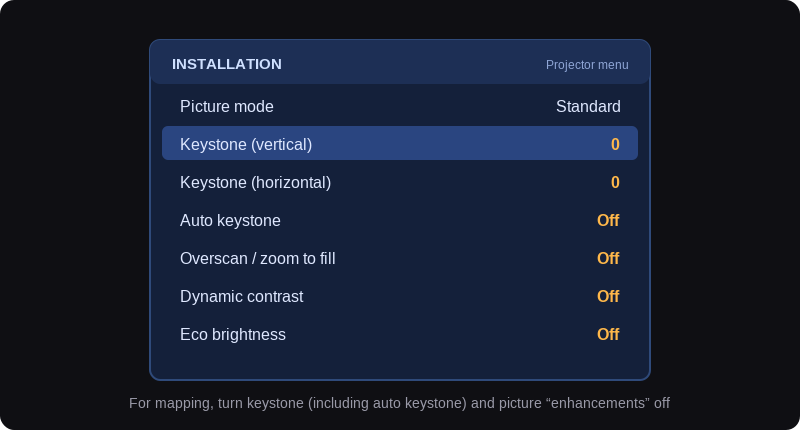
Whatever you buy, change these settings for mapping:
- Keystone correction: off. Including "auto keystone". Kaleidal Mapper corrects the angle without wasting resolution.
- Picture mode: choose a "standard" or "cinema" mode for accurate colour, or "bright" if you need every lumen.
- Overscan / zoom-to-fill: off, so every pixel your computer sends is shown.
- Dynamic contrast, eco-brightness and motion smoothing: off. They change brightness and timing on their own, which looks odd on mapped content.
- Resolution: set your computer to send the projector's native resolution.
Connecting more than one projector
For bigger surfaces you can use two or more projectors side by side and blend the overlap. Your computer needs a video output for each projector — many laptops have two, and USB-C docks or display splitters can add more. Try to use identical projectors, so brightness and colour match.
A sensible first purchase
If you're starting out, a used or entry-level 1080p projector of around 3,000 ANSI lumens with zoom is a great all-rounder: bright enough for walls and windows at night, flexible to place, and affordable. Upgrade to laser and more lumens once you know what kind of work you enjoy. Buying for a Christmas or Halloween display? See A budget projector for holiday displays.