
Event, wedding and church projection mapping
Updated 3 November 2026
Light up a stage, an altar, a wedding backdrop or a conference wall with projection mapping: ideas, planning, a run-of-show checklist and safety.
A projector can change the mood of a whole room in seconds: names above a wedding's head table, arches that glow in a church's seasonal colours, or a stage wall that turns into a starfield between speakers. You light the room itself instead of building or renting a set, and you can change the look as often as the event needs.
This page covers one-off and regular events alike: weddings, services, conferences, fundraisers, school plays and community nights. The planning is the same; only the content changes.
Ideas by occasion
Weddings
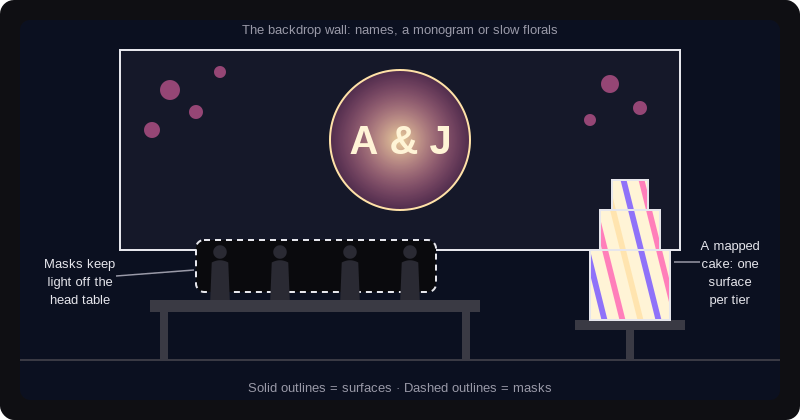
- Names or a monogram above the entrance or the head table
- Floral walls: flowers blooming and drifting slowly across a plain wall
- A mapped cake: a white cake is a beautiful surface for colour and pattern, one surface per tier
- A first-dance backdrop: a starfield, an aurora or soft light behind the couple
- Your story: photos from your years together, mapped into frames on the wall
Churches and services
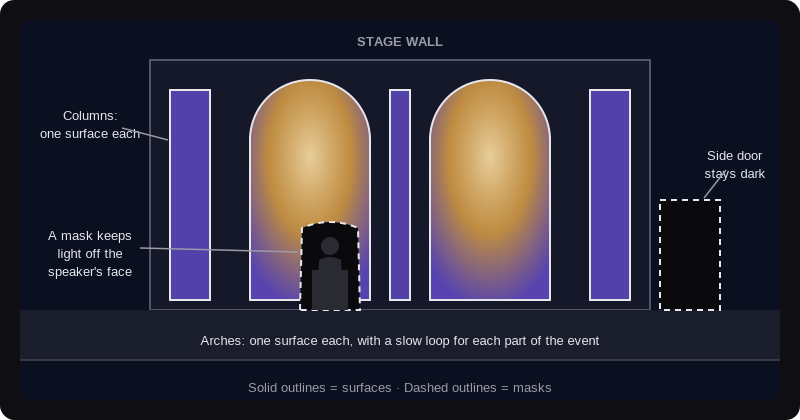
- Architecture in calm colour: arches, columns, alcoves and ceilings
- Seasonal looks: candles, stained-glass patterns, snowfall for Advent, spring light for Easter
- Welcome moments: a verse or a greeting that builds from light as people arrive
Conferences, fundraisers and community events
- Stage backdrops that change between speakers, songs or acts
- Theme and sponsor walls in the event's colours
- Countdowns and transitions that tell the room something is about to start
Plan it in five steps
- Visit the room at the time of day of the event. Daylight, house lights and candles decide how bright your projector needs to be. Take photos from where the projector could sit.
- Choose the surfaces. Each wall, arch, column, sign or cake tier becomes its own surface in Kaleidal Mapper. Straight walls use a quad; arches and curved walls suit bezier or mesh surfaces, which bend to follow the shape.
- Mask the no-go areas. Doors, exit signs, windows, light fittings, and anywhere people stand or sit facing the projector. Masks keep light off them while the rest of the room glows. See Masking around windows, doors and obstacles.
- Prepare a look for each part of the event, from calm to lively: a slow loop for arrival, something gentle during dinner or a sermon, brighter moments for key points, and black when attention belongs elsewhere.
- Rehearse in the room. Walk the space from the back, from the sides and from the stage, to check for shadows, glare and anything you forgot to mask.
Choosing and placing the projector
- Brightness: in a dark room, around 3,000 ANSI lumens is often plenty for one wall. With house lights partly on, or a large or light-coloured wall, plan for 5,000 or more. More in Choosing a projector.
- Rent or buy? For a one-off wedding, renting a bright projector from a local AV company is usually the better deal, and they can advise on lenses. For a church or venue that runs weekly events, buying pays off quickly.
- Position: behind and above the audience is best, on a sturdy stand or a balcony, so people don't walk through the beam. A short-throw lens helps where the room is shallow.
- Wide walls: two projectors side by side, blended into one seamless picture, need Kaleidal Mapper Pro. See Edge-blend two projectors.
A run-of-show checklist
Print this, or keep it on the laptop beside Mapper.
- Arrival: a slow welcome loop, names or a logo. Room lights up.
- Main part (ceremony, service, talks): calm, slow content, or black. Nothing that competes with the people speaking.
- Key moments (the first dance, a reading, an award): one special look, ready in advance.
- Breaks and dinner: gentle movement only.
- Party or close: brighter colour and more movement.
- End: Blackout, then switch off.
Save the project with a clear name, and open it once more on the day to check everything loads. The free plan needs internet to start, but a dropped connection won't stop a show that's already running; if the venue has no Wi-Fi, start Mapper with a phone hotspot before guests arrive.
Hand it over
On the night, the person who set it up is often busy being a guest, a host or a pastor. Pick one person to run the projection, and show them three things:
- How to switch between looks
- The Blackout button (or the B key), which takes every projector to black instantly
- Where the projector's power switch is
A short written cue list, like the checklist above with times added, makes it easy for a volunteer.
Safety and respect
- Cables: tape them down or run them along walls, away from aisles and exits. A trip in the dark spoils any event.
- Heat: projectors run hot. Keep vents clear and never cover the projector with fabric or flowers.
- Exit signs and fire rules: never project over exit signs, and check any venue rules about equipment in aisles.
- Faces: keep light out of people's eyes with masks, especially at a lectern, an altar or a head table.
- No fast strobing: fast flashing can affect people with photosensitive conditions. Keep content slow during reflective moments.
Photos and video
Projection looks most magical when the room lights are low. Tell your photographer or videographer which moments you'd like captured, and ask them to set exposure for the projection, not for the room. Slow content photographs better than fast movement.