
Projection mapping for artists, DJs and venues
Updated 3 November 2026
Map a DJ booth, hanging shapes, a sculpture or a gallery wall with one projector and a laptop: ideas, setups, playing to music and installations.
A projector and a laptop can turn a small room or a single object into something people stop to look at: the front of the DJ booth pulsing with colour, white shapes on the wall flashing on the beat, a sculpture whose surface seems to shift and breathe.
Artists and DJs use projection mapping for different reasons, but the craft is the same: fit light exactly to real objects, choose content that suits the room, and keep it running smoothly for hours.
Ideas
In a bar, club or small venue
- The DJ booth front: the most-watched surface in the room
- Hanging shapes: triangles, hexagons or boards cut from white foam board, each mapped separately
- Walls and columns: slow colour washes that build through the night
- The bar: subtle patterns that don't distract from serving
- The night's name or logo between sets
In a studio, gallery or public space
- White geometric forms: boxes, pyramids, folded paper, each face mapped separately
- Sculpture and casts: subtle light and colour moving across the form
- Found objects: furniture, books, plants, instruments
- Architecture in miniature: a model building whose windows light up one by one
- Gallery walls: light that follows the room's real features
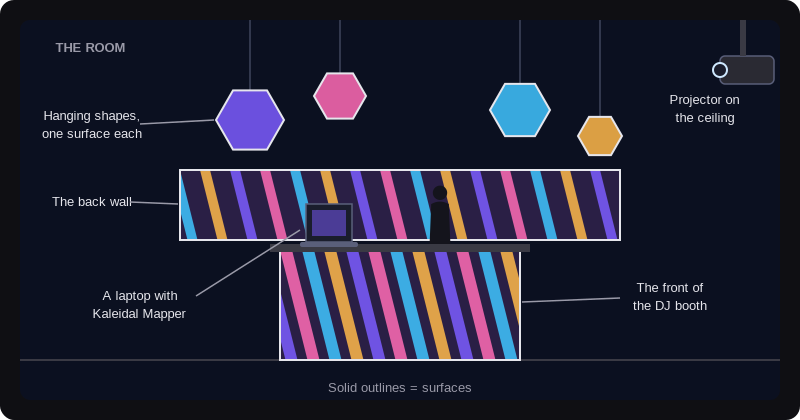
Setup 1: a stage backdrop for a DJ
- Build the surfaces. Four to six white foam-board shapes on the wall behind the booth, plus the booth front. Matt white reflects best; avoid gloss, which shows a hot spot.
- Place the projector high and in front, on a stand or a shelf, so the DJ's head doesn't cast a shadow. A short-throw lens helps in a shallow room.
- Map it. In Kaleidal Mapper, add one surface per shape and drag its corners onto the real corners. The free plan includes 4 surfaces and 4 layers on one projector.
- Add content. Your own loops, or the built-in generative visuals (tunnels, plasma, noise and waves), which run live without any footage.
- Add effects such as strobe, kaleidoscope, RGB shift, glitch or zoom and spin, and save a few looks for the night: warm-up, peak and close.
Playing to the music
Mapper's effects can follow a tempo: set the BPM or tap it in, and animate any effect setting so a strobe lands on every beat or a zoom on every bar. Tempo sync is part of Kaleidal Mapper Pro.
Mapper follows a tempo you set, not the sound itself: reacting directly to live audio from a microphone isn't available in the browser version yet. Until then, loops cut to the music's tempo (128 BPM is common for house) look in time when you start them on the beat.
When to use a VJ tool instead: if you need to trigger many clips live from a controller, audio-reactive effects or DMX lighting control, a dedicated VJ app such as Resolume is built for that. Kaleidal Mapper is simpler and focuses on fitting light to objects. See Kaleidal Mapper vs Resolume Arena.
Setup 2: a sculpture or gallery installation
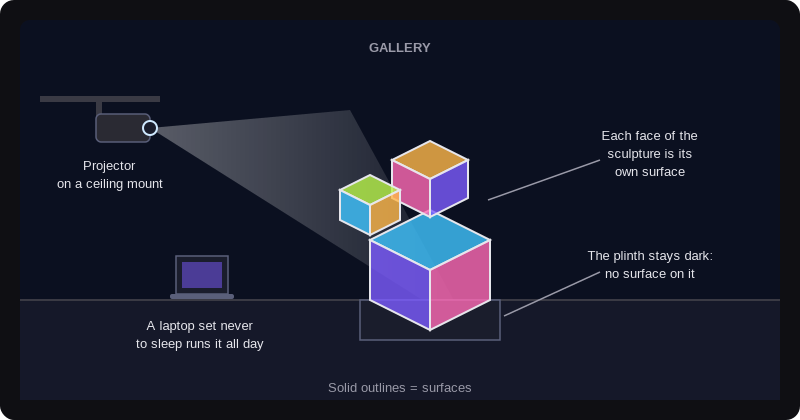
- Choose the form. White or pale, matt surfaces work best. Stacked boxes are a good first project: every face is a flat quad.
- Mount the projector on the ceiling or a tall stand, out of reach and out of the visitors' path.
- One surface per face. Quads for flat faces, bezier for curves, mesh for bumps and irregular forms.
- Precise masks make light stop exactly at the object's edge, so the plinth and the wall behind stay dark. Draw them with the freehand tool and refine with the brush.
- Content that rewards a long look: generative visuals never repeat exactly, and slow footage loops quietly without a visible join. See Video formats for smooth projection mapping for seamless loops.
- Several sides: lighting a form from two or more sides needs more than one projector, which comes with Pro.
Keeping it running for hours
An installation, or a long night, is a different test from a five-minute rehearsal.
- Turn off sleep, screen savers and automatic updates on the laptop for the length of the show.
- Output windows keep playing even if the editor tab is closed, so a stray click in the editor won't stop the projector.
- The free plan needs internet to start, but a dropped connection won't stop a show that's already running. Fully offline use, starting with no internet at all, comes with the paid plans.
- Test for a whole day before opening. Warm projectors and long runs reveal problems that short tests don't.
- Plan for the projector's life: lamp projectors need breaks and new lamps; laser and LED projectors suit long daily runs better.
Safety
- Strobe carefully: keep fast flashing short and warn guests. Flashing light can affect people with photosensitive conditions.
- Cables and heat: tape cables away from walkways, and keep the projector's vents clear.
- Beam height: keep the light out of people's eyes, especially near the booth and on a dance floor.