
Projection mapping for shop windows
Updated 18 November 2026
Shop window projection: film on the glass or light on your products, ideas for every season, running it each night, and what to check first.
A moving window gets noticed in a way a printed poster can't. With one projector you can animate the glass itself, or map light onto the products, mannequins and props behind it, and change the whole window for a new season without building a new display.
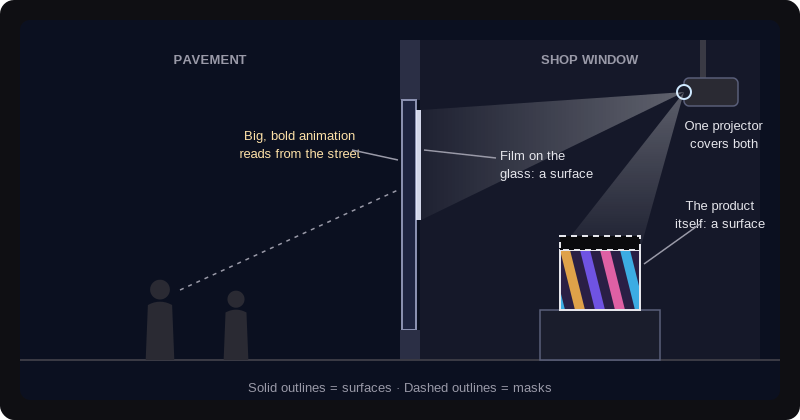
Two ways to do it
| On the glass | On the display behind | |
|---|---|---|
| How | Rear-projection film on the inside of the window | Map onto products, boxes, walls and props |
| Best for | Text, characters, seasonal scenes, promotions | Making real products glow, move or change colour |
| Works in daylight? | Only with a very bright projector; best after dark | Better indoors, but still brightest at dusk and night |
You can also combine them: a scene on the glass, with a product behind it lit in the same colours.
Choosing the film
Rear-projection film sticks to the inside of the glass, and the projector shines onto it from inside the shop. There are two broad kinds:
- Grey or white film shows a brighter, more solid picture, but it blocks the view into the shop wherever it's stuck.
- Clear ("holographic") film stays see-through, so the picture seems to float in the window. It's dimmer, so it needs a darker street or a brighter projector. Black parts of your video stay clear, so a dark background makes shapes look like they're hanging in the air.
You don't have to cover the whole window. A panel the size of a door, or a circle, is cheaper and often looks more deliberate. Try a small sample piece first if the supplier offers one.
Set it up
- Choose the surfaces: the film, a back wall, plinths or product boxes. Each becomes one surface in Kaleidal Mapper.
- Fit each surface by dragging its corners onto the real object. Use bezier or mesh surfaces for curved shapes. See Map your first wall.
- Mask out anything that should stay unlit: signage, price tags, mannequin faces. See Masking around windows, doors and obstacles.
- Load your content: short loops (10–30 seconds) with bold shapes and few words read best from across the street. Mapper's free library has free clips from Wikimedia Commons and, when available, Pexels and Pixabay, with their credits, if you need something to start with.
- Check it from outside, from across the street and from both sides, at the time of day it will run.
Placing the projector
- Space is tight in most windows. A short-throw projector sits close to the glass and keeps customers from walking through the beam. The throw distance calculator tells you how far back your projector needs to be for the size you want.
- Brightness: shop interiors are bright. Dim the window area, or choose a brighter projector (roughly 3,000–6,000 lumens for a window that runs in the evening). More in Choosing a projector.
- Heat and sun: a window in afternoon sun gets hot. Keep the projector and the computer out of direct sunlight, with their vents clear.
- Out of reach: mount or shelve the projector where customers and staff can't knock it, and tape cables down along the edges of the display.
Content that works
- A product "unboxing" itself, or colours sweeping across the real product
- Your logo built from light, then dissolving into a pattern
- Sale announcements that animate in. Keep it to a few big words, on screen long enough to read twice
- A slow scene with one moment of surprise, so people who stop get a reward
Fast cuts and small text don't work through glass from across the street. Slow, bold and high-contrast does.
Ideas through the year
- January: sale messages and a fresh, clean look after the holidays
- February: hearts, roses and warm colours for Valentine's Day
- Spring: blossoms, rain turning to sunshine, new collections arriving
- Summer: waves, sun and long evenings; local festivals and events
- Back to school: notebooks, pencils and chalkboard drawings
- October: a Halloween window with ghosts or a silhouette at the glass
- Late November: countdowns for the big sale weekends
- December: snow, lights and a Christmas window
Keep one evergreen loop of your brand for the weeks in between.
Running it every night
- Start at dusk. Projection looks best from dusk until late evening, when people walk past and the street is dark.
- Before you leave: open the project, start the output on the projector, and check it once from the pavement. Set the computer so it doesn't sleep or lock its screen while the display runs.
- Power: a timer plug can turn the projector off late at night. Check your projector's manual for how it likes to be powered down, because some need to cool before the power is cut.
- Internet: the free version needs a connection to start, so keep the shop's Wi-Fi on. A dropped connection won't stop a display that's already running.
Check before you start
- Your landlord or shopping centre may have rules about window displays, equipment and power left on overnight.
- Your local council may have rules on moving or illuminated displays that can be seen from a road, especially flashing ones. A slow, steady display is the safest choice.
- Music and footage: use only material you have the rights to. Mapper's library clips come with the credits to show.
How to tell if it's working
Note how many people stop or come in on a few evenings before the window goes up, then compare once it's running. Ask new customers what brought them in. If you show a web address or a QR code, test it with a few phones from the pavement first.